Next Chess Move
- 4.4
- Rating
- 10.00K
- Installs
- $2.99
- Price

 Analysis by App-foxy
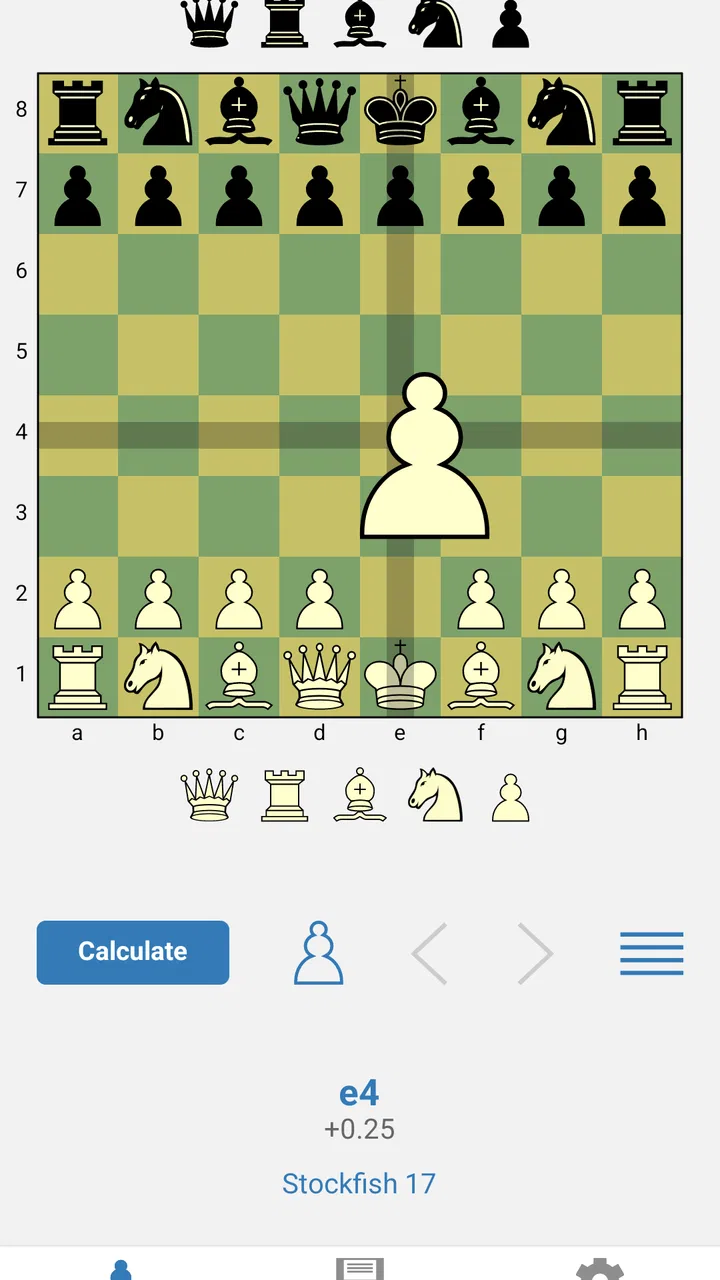
I approached Next Chess Move less like a casual chess game and more like a pocket analysis tool. It is a board game for Android from Next Chess Move LLC, built around calculating a move rather than replacing the whole experience of playing chess. That distinction matters. If you want a complete online chess platform with opponents, tournaments, puzzles, and social features, this is probably not where I would start. If you already play on another board, however, the app has a much clearer purpose: help you examine a position when your own calculation reaches its limit.
My first impression was that its value depends heavily on how you use it. A move calculator is most useful when you bring it a meaningful position and ask a focused question. It is less satisfying when you expect a guided course or a polished game room. In practice, I found myself treating it as a second opinion: I would study a position myself, choose a candidate move, and then use the app to challenge that decision. That workflow makes the tool feel practical rather than magical.
Where the real friction begins
The main difficulty is not understanding that the app calculates chess moves. The difficulty is setting up the exact position you want to examine. A single misplaced piece, an incorrect side to move, or a forgotten special condition can make the resulting recommendation look strange. When the answer seems completely unrelated to the position in front of you, I would first suspect the board setup rather than the calculation.
You May Also Like

 Blood Strike: 2.5 Anniversary
Blood Strike’s Loadouts Turn Every Drop Into a Tactical Gamble
A close look at Blood Strike’s custom loadouts: how fast access to signature weapons reshapes its battle royale rhythm, rewards preparation, and narrows the gap between fights.

 Pandora - Music & Podcasts
Pandora’s Music Is Easy to Start, but Harder to Recover
Pandora’s strength is its low-effort path from a seed to a station. Its weak spot is how much confidence it asks you to place in connection, setup, and quiet recovery.

 8 Ball Pool
 Is Built on Rivalries, Rematches, and Routine
A close look at the rivalries, rematches, shared routines, and unanswered safety questions that turn a quick pool match into a persistent mobile community.

 Samsung Music
’s Quiet Strength Is Playing What You Already Own
Its reach comes less from spectacle than from dependable access to a personal library. That simplicity is both the app’s strongest retention engine and its ceiling.

 AccuWeather: Weather Radar
AccuWeather Review: A Quick, Clear Forecast for Everyday Decisions
For everyday plans, the best forecast is the one you can understand quickly. AccuWeather makes rain timing, radar, and local conditions easy to act on, with a few trade-offs.

 Hill Climb Racing
Why Hill Climb Racing Still Turns Crashes Into One More Run
A tiny car, a bumpy hill and one more upgrade: Hill Climb Racing keeps resurfacing because its simple chaos makes every near-miss feel personal.
More From Our News Desk
View All News


This is especially important when you are reconstructing a position from a game played elsewhere. Chess positions are unforgiving: one square changes the tactical possibilities, and the calculator cannot know what happened before the current arrangement. I recommend pausing after entering the board and checking every occupied square one rank at a time. It is slower than immediately pressing the analysis control, but it prevents the most frustrating kind of error—spending time interpreting a line that came from the wrong position.
Another common sticking point is expecting a single move to explain itself. A calculator can point toward a strong continuation, but a move that looks quiet may be based on a tactical idea several turns later. Conversely, a flashy move may only work because of a detail you overlooked. I get more from the app when I write down my own reason for choosing a move before checking it. That gives me something concrete to compare with the recommendation instead of simply accepting the first answer.
The app is also easy to misunderstand if you approach it as a normal chess opponent. Its central job is analysis, not creating the atmosphere of a full chess service. That makes it valuable for post-game review and position checking, but less suitable if your priority is finding a human opponent quickly. The usual alternatives in the board-game category often focus on playing, lessons, or community features; this one is narrower and more useful when you already have a position to investigate.
What to check before asking for a move
I developed a simple setup routine that saves time. First, I confirm whose turn it is. Then I inspect kings, queens, and rooks before checking the minor pieces and pawns. Those major pieces are the easiest way to spot an obvious reconstruction mistake, and they often reveal whether the position is meant to be tactical or strategic. Finally, I look for open files, pinned pieces, and pieces that appear to be hanging. This last pass helps me understand why the calculator may prefer a move that feels defensive.
If you are entering a position from a physical board, do not rely on memory alone. I would keep the original board visible and transfer the position systematically from one side to the other. If you are reviewing a position from a digital game, pause the game at the exact moment you care about instead of trying to recreate it from a later diagram. The app can calculate the position you provide, but it cannot correct a board that was entered approximately.
There is also a useful mental check before analysis: ask what changed on the last move. Was a defender removed? Did a file open? Did a king lose a flight square? This question often tells you whether you are looking for a tactical response or a positional improvement. It also makes the result easier to learn from, because you are connecting the recommended move with an actual event on the board.
For beginners, the setup process may feel more demanding than opening a standard chess app and starting a game. That is a genuine trade-off. The effort is worthwhile when you want to study a specific position, but it can feel excessive when all you want is a quick casual match. I would not choose this tool as my only chess app unless analysis is already a regular part of my routine.
How I use the calculator without turning off my own thinking
My preferred workflow has three stages. I first spend a few minutes calculating without assistance. I identify candidate moves, look for forcing replies, and decide what I believe the opponent should do. Only then do I consult the app. This turns the recommendation into feedback. If I check immediately, I may remember the move but fail to understand the pattern that made it strong.
When the suggested line differs from mine, I do not automatically assume I made a blunder. I replay the position and search for the first point where my calculation and the app's continuation separate. Often the difference is not the first move but an overlooked reply. That is where the learning happens. I pay particular attention to quiet defensive resources, intermediate checks, and exchanges that change the value of a piece. These are the details most likely to escape a quick human scan.
A practical tip is to test a move you dislike, not just the move you expect. If the calculator prefers a retreat or a pawn move, I examine the alternatives I initially wanted to play. This can expose why an attractive attack fails or why a material gain is temporary. The tool becomes more useful when it challenges my preferences rather than confirming them.
I also avoid treating the longest line as the only lesson. A continuation can be difficult to remember if I do not understand its purpose. I ask myself whether the recommendation is winning material, preventing a threat, improving king safety, or preparing a break. That classification gives the analysis a useful shape. It is a small habit, but it keeps the app from becoming a button that produces moves without improving my chess.
Recovering when the result looks wrong
When an analysis seems implausible, I use a recovery process instead of repeatedly requesting another answer. I return to the board, verify the side to move, and compare the piece placement with the original position. I then check whether I accidentally left a piece on a square it had already left or omitted a captured piece. These are ordinary mistakes, but they are much more likely than a mysterious failure of chess logic.
Next, I simplify the question. Rather than trying to understand an entire complicated position at once, I compare two candidate moves. I look at the first response to each move, then ask what tactical feature the calculator is prioritizing. This makes a confusing recommendation easier to inspect. A move that appears passive may be stopping a direct threat; a move that appears aggressive may be allowing a forcing reply.
If the position comes from a game, I would also review the move immediately before it. Sometimes the apparent problem began earlier, and the current position simply exposes it. In that situation, the calculator is not failing because it recommends an uncomfortable move. It may be showing that the position has already become difficult. That distinction is important: analysis tools often reveal consequences rather than provide a way to undo them.
There is a useful difference between a wrong-looking move and a move you do not yet understand. To separate the two, examine the opponent's strongest reply rather than the move in isolation. If the recommendation survives the reply you considered most dangerous, it deserves closer attention. If your board setup is correct but the line still seems unclear, use the position as a study exercise and calculate the alternatives manually. The app can direct your attention, while your own reasoning supplies the explanation.
Because this is a focused calculator, I would not expect it to repair every weakness in my chess automatically. It can help identify a missed tactic or compare choices, but it cannot replace learning basic principles, reviewing complete games, or practicing against opponents. That is not a criticism of its purpose; it is simply the boundary of a specialized tool.
Everyday situations where it earns its place
One realistic use is reviewing a short game after work. I might remember one moment when I felt the position suddenly slipped away. Instead of replaying every move without a plan, I reconstruct that position and compare my move with the alternative I was considering. If the app points to a defensive resource, I can return to the game with a specific lesson: perhaps I needed to address a threat before starting my own attack.
Another useful situation is preparing for a friendly game. I would not use it to memorize a long sequence and hope the opponent follows it. I would use it to examine a few positions that commonly arise from my opening choices, especially positions where I repeatedly make the same type of decision. The benefit is not remembering one perfect move; it is recognizing the tactical warning signs that tell me when my usual plan needs adjustment.
It can also help when a friend sends a position and asks, “What would you play here?” I can first give my honest answer, then use the calculator to test it. That keeps the conversation about ideas rather than authority. If the recommendation differs, we can investigate the reason together. For a chess player who enjoys analysis away from a full desktop setup, that is a more natural role than using the app as a standalone game.
I would be cautious with positions taken from puzzles unless I am using the result as a check after solving. Looking at the answer too early removes much of the value of the puzzle. The same applies to study: if I consult the calculator before forming a plan, I may become dependent on external confirmation. My strongest results came when I treated it as a coach's hint after doing the hard part myself.
When the app is not the cause of the problem
Not every disappointing result means the application has malfunctioned. Chess analysis can produce moves that conflict with human preferences, especially when the best choice involves patience, repetition, or giving up a temporary advantage. Before blaming the tool, I ask whether I can identify the tactical reason behind the move and whether the position was entered accurately.
The device and software environment can still affect the experience. This title supports Android from version 7.0 onward, and it is currently listed as version 4.2.1. If it behaves unexpectedly, I would begin with ordinary checks: make sure the app is installed from a reliable source, restart it, confirm that the operating system is supported, and recreate the position carefully. I would avoid assuming that reinstalling will preserve any work unless I have already recorded the position elsewhere.
Cost is another part of the decision. The listed purchase price is $2.99, while in-app items are listed at $18.99 each. That makes it important to understand your expected use before paying. For someone who analyzes positions several times a week, the focused design may justify the expense. For an occasional player who mainly wants free games and casual puzzles, a broader chess platform may offer better value even if its analysis is less central.
The age classification is Everyone, which fits the basic nature of a chess calculator. I would still think about the intended user rather than the label alone. A child who wants to play immediately may find the analytical workflow less engaging, while a young player studying tactics could benefit from using it alongside an adult or coach who explains the recommendations. The tool is accessible in subject matter, but its best use depends on having a clear question about the position.
How it compares with ordinary chess apps
Most people discover chess through an app that lets them start a game with a person or a computer. Those apps are usually better for building a playing habit, tracking games, or moving through lessons. Next Chess Move occupies a different space. It makes more sense as a companion to those services, a physical board, or a chess book than as a replacement for them.
Compared with a general-purpose chess app, its advantage is focus. You are not navigating a busy game hub when all you want is to inspect a position. The disadvantage is equally clear: a narrow calculator does not provide the same all-in-one experience. If you want opponents, a lesson path, community interaction, or a record of your complete playing activity, I would choose a broader alternative and use this only when I need concentrated move analysis.
It is also different from simply asking a stronger player for advice. A friend or coach can explain plans in language that matches your level and point out recurring habits across several games. The calculator can be more convenient for a quick check, but it does not replace that human context. I see the best setup as complementary: use the app to locate critical positions, then discuss the most instructive ones with a person who can explain the underlying chess idea.
Who should install it, and who should pass
I would recommend it to players who already know how to read a chessboard and want a direct way to test their calculations. It is particularly suitable for reviewing personal games, checking tactical positions, and comparing candidate moves before committing to an idea. The modest install base—over 10 thousand installations—does not tell me whether it will fit every player, but its average rating of 4.4 from around 200 ratings suggests that the focused concept works well for a portion of its audience.
I would skip it if my main goal were online competition, a structured beginner course, or a social chess community. I would also hesitate if I rarely analyze positions and would rather spend my time playing. The setup effort is part of the product's character, not a minor inconvenience that disappears for every user. Players who enjoy thinking through a position will likely see that effort as worthwhile; players seeking instant entertainment may see it as a barrier.
For me, the deciding question is simple: do I have a specific chess position I want to understand? If the answer is yes, the app has a clear job and can be genuinely useful. If the answer is no, a conventional chess game will probably provide a more enjoyable first step.
My practical verdict
Next Chess Move is a focused board-game utility with a sensible place in a serious player's toolkit. I like it most when I use it after my own analysis, when I am reviewing a critical moment rather than asking it to play chess for me. Its strongest quality is concentration: it directs attention toward the move decision itself. Its main weakness is that the value falls sharply when the position is entered carelessly or when the user expects a complete chess ecosystem.
Before buying, I would decide how often I analyze, whether I am comfortable reconstructing positions, and whether the additional in-app cost fits my intended use. I would also keep a written record or screenshot of important positions so that a restart or setup mistake does not erase the work of reviewing them. Those small habits make the experience much smoother.
With its Everyone rating, support for Android 7.0 and later, and release history beginning in May 2017, it is an established, narrowly defined option rather than a modern social chess hub. The developer, Next Chess Move LLC, has kept the identity clear: this is for asking chess questions on a board, not for surrounding the game with distractions. If you want a compact second opinion for positions you already care about, it is worth considering; if you want a complete place to play, learn, and meet opponents, choose a broader chess app instead.
FAQs for Next Chess Move
01What is Next Chess Move, and how does it work?
Next Chess Move is a chess analysis app designed to help players find strong moves in ongoing positions. You can enter a position manually, load or review a game, and request engine-based suggestions. The app evaluates the board and presents candidate moves, making it useful for checking tactics, studying mistakes, preparing openings, or understanding why one move is stronger than another.
02Is Next Chess Move suitable for beginners or only experienced chess players?
The app can be useful for both beginners and advanced players, although the experience may feel more natural to users who already understand basic chess notation and board coordinates. Beginners can use it to explore legal moves, identify tactical opportunities, and review games, while experienced players may appreciate its quick engine analysis. It should be viewed as a learning aid rather than a replacement for structured chess instruction.
03Can Next Chess Move analyze my own games and chess positions?
Yes, one of the main purposes of Next Chess Move is analyzing positions from your games or from situations you want to study. Depending on the version and available features, you may enter moves on the board, import a position or game notation, and ask the engine for recommendations. Reviewing the suggested variations is especially helpful because it shows the consequences of different decisions.
04Does Next Chess Move require an internet connection?
Internet requirements can depend on the app version, the analysis method, and the features you use. Some chess engines can calculate positions directly on the device, while other functions—such as online services, account features, advertisements, or cloud-based analysis—may require connectivity. It is best to install the latest official version and check its permissions and store description before relying on it while offline.
05Is Next Chess Move free to download, and are there in-app purchases?
Next Chess Move may be available as a free download, but the exact pricing model can vary between Android and iOS and may change with updates. Some versions or features can include advertising, premium analysis, subscriptions, or one-time purchases. Before downloading, review the official store listing for the current price, supported devices, trial conditions, and any recurring payment details.
Pros
- Shows the strongest engine move in a clear
- easy-to-follow format.
- Useful for checking positions from real games or studying tactical ideas.
- Supports board interaction for testing different moves and variations.
- Clean interface keeps the focus on the current chess position.
- Helpful for players who want quick guidance without a full game analysis.
Cons
- Requires an internet connection for reliable move analysis.
- Engine suggestions may be difficult for beginners to understand.
- Limited value for players seeking lessons or structured chess training.
- Entering complex positions manually can take time.
- Depending on engine analysis may discourage independent calculation.

Next Chess Move
Gallery